Browser-based laser engraver software for GRBL diode machines
From the design to the engraved piece, in your browser: keychains with names, tumblers, photos and logos on wood. Design, generate the G-code and control your machine over USB from Chrome or Edge, on your computer or on your Android phone, with nothing to install. In Spanish, with an English translation, paid in Mexican pesos, and a simple LightBurn alternative to get started.
Check if my device is compatible · Open the app
- Atomstack, Sculpfun, Ortur and more (GRBL 1.1)
- Android over an OTG cable
- Opens your LightBurn projects (.lbrn2), SVG and G-code
What RapiLaser is
RapiLaser is design and control software for diode laser machines running GRBL 1.1 firmware. It works entirely inside the browser: nothing to install, no Windows version to download, and you do not need a powerful computer. It is in Spanish, with an English translation: the whole app, the editor and the Machine screen included, switches language with the flags, and so do this site, the trial request, checkout and the diagnostic. Support is in Spanish. It is made for Mexico and Latin America.
With RapiLaser you draw the piece, set power and speed layer by layer, generate the G-code and send it to the machine over the USB cable — all from the same screen. The G-code is calculated on your own device and never goes through a server while the machine is engraving.
First time here? Start with the diagnostic: in 10 seconds it tells you whether your browser and your device can talk to the machine — no account, no cable and nothing to install. The app opens with your license code: request one free for 30 days, or buy it.
Free 30-day trial license. Request it here: it takes two minutes and we do not ask for a card. If you would rather write to us, rapilaser@rapilaser.com.
What RapiLaser looks like inside
Two screens: the Editor, where you design and set power, speed and passes per layer, and Machine, where you connect, frame and engrave. The STOP button sits at the top, in red, on both. The screenshots show the app in English; the flags in the top bar switch it to Spanish.
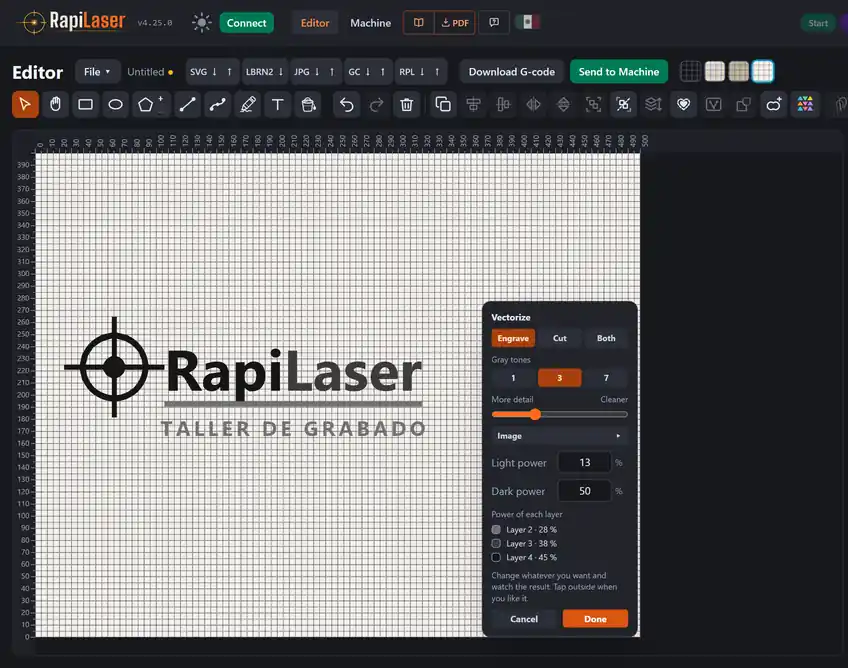
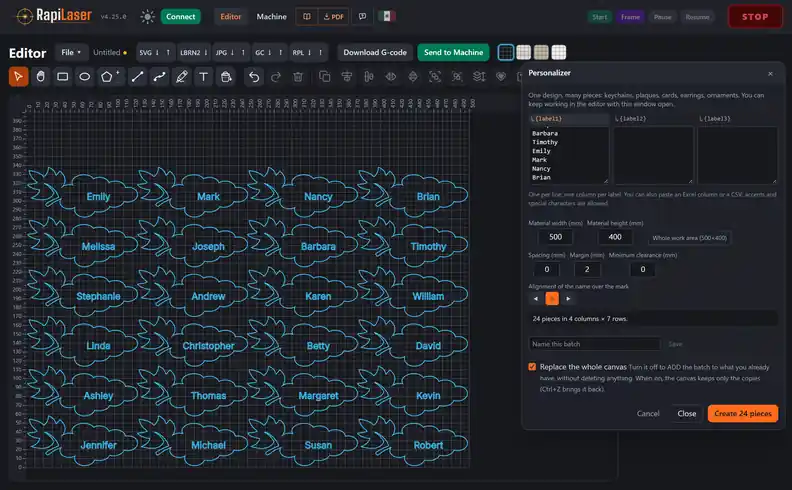
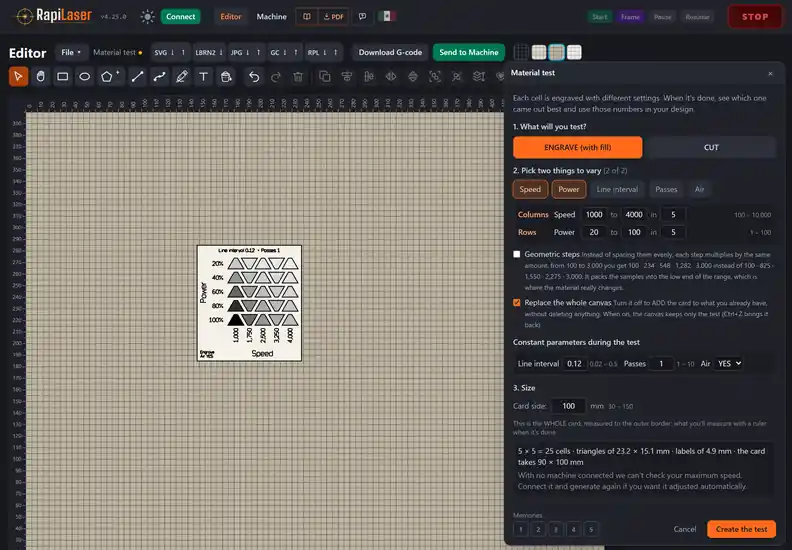
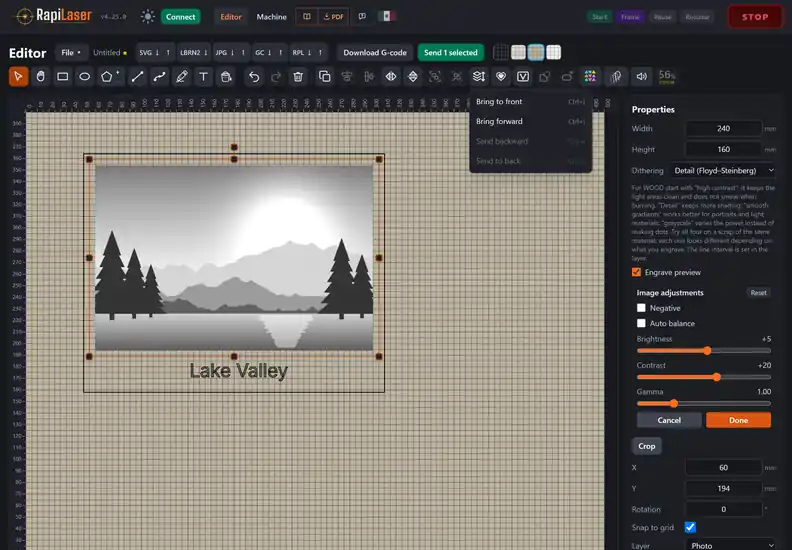
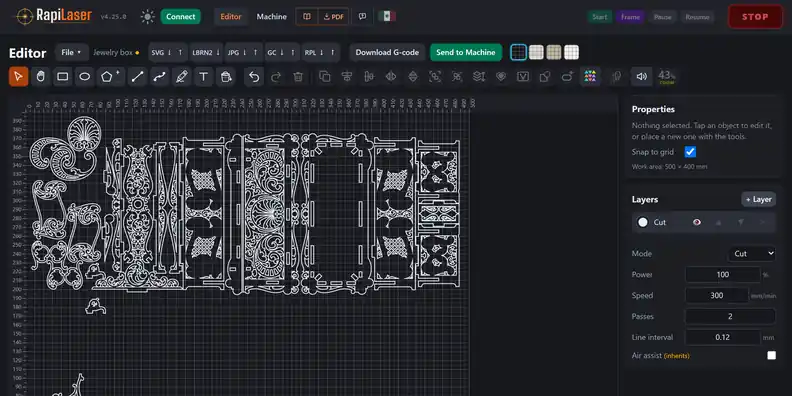
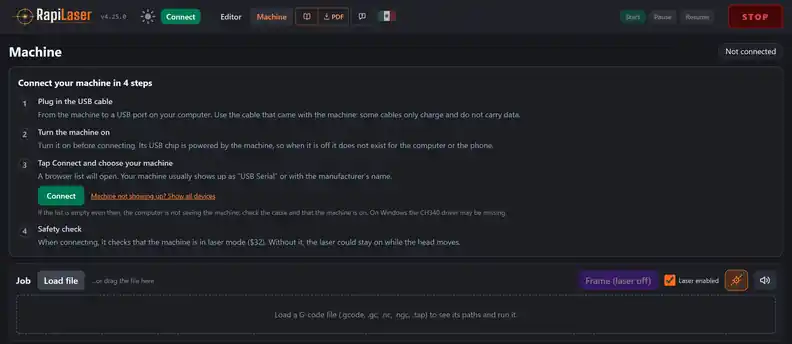
Real screenshots of RapiLaser 4.25.0 in English, with no machine connected.
What you are going to make
Five jobs people do with a diode laser, and how RapiLaser handles them.
-
Keychains with names
- Draw one piece and place the name mark on it.
- Paste the list from Excel or a CSV; accents come through fine.
- «Create pieces» lays them out on your material.
PersonalizerCut outline -
Tumblers and mugs with a roller
- Plug the roller in instead of the Y-axis motor.
- Calibrate once; it works for any diameter.
- Without touching your machine's settings.
Rotary modeNo chuck or tapered -
From your phone
- Design on the laptop and save your .rpl project.
- Connect the Android phone to the machine with an OTG cable.
- Engrave with the tab visible; STOP is one tap away.
Android + OTGNo app -
Logos and photos on wood
- A photo is engraved dithered or in grayscale.
- A logo is vectorized into 1, 3 or 7 tones, one per layer.
- Preview how it will engrave before burning anything.
VectorizeDitheringImage adjustments -
Finding the right material settings
- Pick two things that change: speed, power, line interval, passes or air.
- Engrave the labeled card.
- Use the numbers from the cell that came out best.
Material test5 presets
From the idea to the machine, on one screen
-
Design
Shapes, text with your own fonts, pencil, merge shapes, mirror, arrange, and layers with their own power and speed.
-
Check
A time estimate based on your machine's acceleration, a warning if something falls outside the work area, and framing with the laser off over the material.
-
Engrave
The G-code is calculated on your device and goes down the cable. The head tracker shows you where the head is.
Which files it opens
- .lbrn2 (LightBurn)
- SVG
- PNG
- JPG
- WebP
- G-code
- .rpl
LightBurn files, SVG, images for grayscale or dithered engraving, and G-code files you already have.
What it exports
- SVG
- G-code
- Image
- .rpl
SVG, G-code, an image of how the piece will look to show your customer, and its own .rpl format.
Works with your machine
RapiLaser controls diode laser engravers running GRBL 1.1 firmware or a compatible one, which is what most machines sold online use. It has been tested with an Atomstack A70 PRO and a Sculpfun S30 PRO. These are the most common brands; each one leads to its models:
- The connection is over a USB cable, from Chrome or Edge on a computer, or from Chrome on Android with an OTG cable.
- Newer xTool models and LaserPecker do not work: they use a closed protocol. CO2 machines with a Ruida controller are not controlled from RapiLaser either.
- On iPhone and iPad the machine cannot be connected.
See every compatible brand and model · Confirm with the diagnostic, which connects to your machine and tells you which firmware it runs.
Engraving from your phone
An Android phone with Chrome can control the machine through an OTG cable, with no computer in between: you design on the laptop and run the job from the phone. That is why many small shops no longer need to keep a computer tied to the laser. On iPhone it is not possible: Safari gives no access to the USB port.
What it has that others do not
- Rotary mode for engraving tumblers, mugs and pens without touching the machine's settings: you calibrate once and it works for any diameter.
- Automatic material test: a card with combinations of power and speed, so you find the right setting without burning ten pieces.
- Personalizer: one design and a list of names to run batches of keychains, tags, cards or earrings in one go.
- Vectorize a logo into gray layers, and a cut outline around shapes, text and images.
- Head tracker: a marker moves over your design on screen while the machine engraves.
- Air assist per layer, and a time estimate that takes your machine's real acceleration into account.
Which program suits you?
No program is the best one for everybody. This is what suits you depending on what you want to do:
| Program | It suits you if… |
|---|---|
| RapiLaser | You are learning from scratch, engrave as a hobby or in a small shop, want to work from an Android phone, need to personalize many pieces with different names, or want easy material tests. In Spanish and priced in Mexican pesos. |
| LightBurn | You need advanced design and CAM, run complex professional production, work with a camera, kerf compensation and dimensional accuracy, use a chuck rotary or tapered pieces, or have a CO2 or galvo machine. |
| AtomStack Studio | You own an Atomstack and prefer to stay within its maker's own software and accessories. |
| LaserGRBL | You use Windows and want a free program to look deep into GRBL: its console, its settings and how it behaves. |
And you do not have to choose forever: RapiLaser opens your LightBurn projects (.lbrn2), your SVG files and your G-code as paths you can keep editing.
A LightBurn alternative, in Spanish and priced in pesos
If you got here looking for a LightBurn alternative, here is what you need to know, with no varnish on it. LightBurn is a mature and very capable program, it covers machines RapiLaser does not (CO2, galvo) and it has editing tools that do not exist here yet. It costs 99 USD for the Core edition and 199 for Pro, paid once, with one year of updates included and 40 USD a year to keep updating. Both offer a 30-day trial.
RapiLaser is a different thing, on four concrete points:
- It is in Mexican Spanish —menus, error messages and support— with an English translation of the whole app, this site, checkout, the diagnostic and the user guide.
- You pay in pesos — $49 MXN a month or $399 MXN a year, Mexican VAT included — through Mercado Pago, with a Mexican card or a bank transfer. No international payment paperwork and no dollar conversion.
- Nothing to install: it runs inside Chrome or Edge, so it does not matter if your computer is old, and there is no program to download or update.
- It engraves from an Android phone over an OTG cable, with no app and no special permissions. A three-hour job does not hold your computer hostage.
Pricing
$49 MXN a month or $399 MXN a year, both with Mexican VAT included — the yearly plan saves you $189 MXN, 32%. Before paying there is a free 30-day trial, no card: the code arrives right away.
Trial
Free
30 days, no card
Monthly
$49 MXN
a month, Mexican VAT included
Yearly
$399 MXN
a year, VAT included; you save $189 MXN
Payment goes through Mercado Pago, with a Mexican card or a bank transfer.
User guide
Everything RapiLaser does, explained step by step for someone who has never used a laser: the first connection, the editor, layers, vectorizing, the rotary and what to do when something goes wrong. In English and Spanish.
Start today
Request your trial license, connect your machine and engrave your first material test. If something does not work, the user guide explains it, and support is in Spanish.
Frequently asked questions
Does it work with my Atomstack, Sculpfun, Ortur or Creality Falcon?
Yes, if it is a diode laser running GRBL 1.1 firmware or a compatible one, which is what those brands and most of the machines sold online use. The list by brand and model is at rapilaser.com/en/compatible-machines/. It does not work with newer xTool models or with LaserPecker, and it does not control CO2 machines with a Ruida controller. If in doubt, the public diagnostic at app.rapilaser.com/diagnostics connects to your machine and tells you which firmware it runs.
Do I need to install anything?
No. RapiLaser runs inside Chrome or Edge, with nothing to install. Firefox and Safari do not work, because they give no access to the USB port. On Windows you may need the CH340 driver for the machine's USB cable.
Does it work on Android? And on iPhone?
On Android, yes: with Chrome and a data OTG cable you control the machine with no computer in between. On iPhone and iPad it is not possible to connect the machine, because every iOS browser uses Safari's engine, which gives no access to the USB port.
How do I make many keychains with different names?
With the Personalizer: you draw one piece, place the name mark, paste the list —one per line, or an Excel column or a CSV— and tap Create. It lays the pieces out on the material you set, and it takes up to three labels per piece.
Can I engrave tumblers and mugs with a diode laser?
Yes, with a friction roller rotary plugged in instead of the Y-axis motor. RapiLaser is calibrated once, without touching your machine's settings, and it works for any diameter. There is no chuck mode and no support for tapered objects.
How do I turn a logo or a photo into something I can engrave?
A photo is engraved dithered or in grayscale, with brightness, contrast and gamma adjustments, and «Engrave preview» shows the result before you burn anything. A logo is best vectorized: Vectorize turns it into paths in 1, 3 or 7 tones, each tone on its own layer with its own power, to engrave, cut or both.
What language is RapiLaser in?
In Spanish, with an English translation. The whole app is in both languages, the editor and the Machine screen included, and you switch with the flags in the top bar. So are this site, the trial license request, checkout, the diagnostic, the legal notice and the user guide. Support is in Spanish, and the in-app problem report accepts English.
How much does RapiLaser cost?
$49 Mexican pesos (MXN) a month or $399 MXN a year, both with Mexican VAT included; the yearly plan saves $189 MXN, 32%. Payment goes through Mercado Pago, with a Mexican card or a bank transfer, and the license arrives right away.
Is there a free trial?
Yes: a 30-day trial license, no card and no commitment. You request it at app.rapilaser.com/solicitud and the code arrives by email right away.
Where is the user guide?
It is public, in English and in Spanish: read it at rapilaser.com/en/guide/, download it as a PDF from that page, and it is also available as plain text and Markdown so any tool can read it.
How do I get access to RapiLaser?
You sign in at app.rapilaser.com with the access code of your license. You can request a free 30-day trial license at app.rapilaser.com/solicitud —the code arrives right away, no card— or buy one at app.rapilaser.com/comprar. Before that it is worth opening the public diagnostic, which tells you in ten seconds whether your browser and your device can talk to the machine.
Does it work without internet?
You need a connection to open the app. The engraving itself runs on your own device.
Where do I hear about what is new?
On the RapiLaser channel on WhatsApp: only we post, nobody sees anybody's phone number, and you can leave whenever you want.